
How to Not Suck at Exception Handling

Yesterday a co-worker sent me an email about an error that was reported to them. “Have you seen this error before? If you have, can you tell me what it means?” This is a huge pet peeve of mine. Too many developers view exception handling as nothing more than an anti-crash mechanism. When an exception occurs, it gets logged and ignored. If the application’s not working, somebody might look at the log and see a repeated error message in the form of an exception.ToString(). That exception gets reported and travels electronically through the ranks until it makes its way back to the developer: “Oh, that exception?” the developer replies, “That just means the certificate is missing.”

Oh, that’s it? Thanks for the info, but I’ve got news for you: you failed. If you can say “That exception means…” then that’s what the application should’ve reported to begin with. Further, an explanation like this should only be forgivable if it’s followed by “I’ll update the application to say that.” Accepting “<insert exception here> means <actual problem>” as a solution should be unacceptable to all parties involved.

The good news for developers is that this isn’t a hard problem to solve: you just have to not suck at exception handling. The even-better news is that it’s not hard to be a good exception handler, you just have to think about what you’re doing and follow a few easy steps.

Reduce exception handling

My smelly-sense definitely goes off when I see code that has exception handling in every single function. This obviously depends on the code–maybe it’s necessary–but you should try to only include exception handling where it’s needed. If you can’t think of anything that can go wrong, don’t cover it up when the unthinkable occurs.

Of course, if you can think of things that might cause exceptions…

Catch specific exception types

This is where you look at your code and think of everything that might go wrong. If you’re writing a file, what happens if you don’t have permissions or the directory is missing? If you’re calling a web service, what happens if the service isn’t available? What happens if you access that database with invalid credentials? Each of these problems produces a specific exception type that can be caught and handled in its own special way. If you know where an exception could occur but don’t know the specific exception type, test to find out.

It would be rude in all of these scenarios to simply pretend that everything is okay and move on. Instead, do the courteous thing…

Provide meaningful messages

Don’t just tell people what happened, tell them what it means or what they can do about it! Should they restart the application? Do they need to contact an administrator? Is it connection problem? Is this going to resolve itself?

I mean, don’t get me wrong: System.ServiceModel.Security.SecurityNegotiationException “SOAP security negotiation with http://localhost/someservice.svc for target http://localhost/someservice.svc failed. See inner exception for more details” is a terrific error, but you’re not doing anybody any favors by showing it in a message box or writing it to a log. Doing something like that is just begging to be bothered for interpretation later. Instead, provide a meaningful message: “A security negotiation exception occurred. Verify that the certificate exists and has appropriate permissions.”

Remember that updating these messages is an important maintenance step. If a new cause for an exception is identified, be sure to add relevant information to your messages to make them as helpful as possible!

Don’t eat exceptions

One of the worst things you can do is to “eat” exceptions. I’m talking about adding try { … } catch (Exception) { } around all your code where the catch logic does nothing or quietly logs some details without indicating any problems to the rest of the application. I’m not suggesting that you let any and all unaccounted for errors crash your application, but allowing exceptions to fail as loudly as possible will lead to a more robust end product. The squeaky wheel gets the oil, you know? If you follow the guidance above, a new exception that was previously unaccounted for will result in code that specifically handles the newly identified scenario and provide meaningful information. The next time the exception occurs, there should be no mystery around what caused it or what should be done as a result.

Test everything*

*Everything that you can think of. The end goal of most applications is (or should be) to create a positive user experience. To that end, when you’re adding exception handling for specific scenarios and providing meaningful messages, you should verify how it will present to the user. If it’s something the user needs to address, make sure they receive clear information about what they should do. If the user needs to contact somebody, such as an administrator, make sure they know what to tell them. If something happened that the user doesn’t need to worry about, maybe you want to make sure that they can’t tell it even happened. Whatever it is that you’re trying to do, test it and make sure it works how a user should expect it to.

Find the Best Wifi Channel with Meraki Wifi Stumbler

Recently, I’ve been having network connectivity issues at home. Browsing the internet is generally fine, but if I try to stream a video or play games online, I have disruptions every few minutes. One of the suggestions that I got from Comcast was that there might be interference on the wireless channel that my router is using.

I’m not wireless pro, but that seemed like a reasonable thing to check out. Before arbitrarily picking a different channel, I wanted to see what other wireless networks around me were using. After a quick or search or two, I found a free wireless analyzer called Meraki WiFi Stumbler.

WiFiStumbler

WiFi Stumber is a simple app that gives you basic details about the wireless networks that can be found. It’s easy to see the signal strength, encryption, and–what I was looking for–channel. Using the app, I did a quick scan to determine a channel that wasn’t being used by one of my neighbors and plugged it into my router. Now I can check wireless interference off my list of possible culprits!

How My Team Does Agile, 2014 Edition

I’ve spent a lot of time and energy over the past few years trying to get my team doing agile software development in a way that feels good to me. We’ve really come a long way, and we’re really getting close to where I want us to be.

Where We Started

When I first joined the team, I was really unhappy with our agile practices. We were running two-week sprints. Before a sprint started, we’d have two meetings: pre-planning and sprint planning. In pre-planning, we’d have 12 developers on their laptops and phones as we went through their assignments person by person. Nobody was invested in anything that anybody else was working on, and so they didn’t bother to pay attention. Everybody would leave with their individual assignments, and they’d come up with the tasks they’d work on to email to the team lead before the sprint planning meeting.

Sprint planning was even worse. We would literally watch the team lead copy/paste tasks from emails into a spreadsheet to be inserted into TFS. There’d be no input or feedback from the team on the tasks, and everybody would just sit and wait for their turn to read their tasks as they were being entered into the spreadsheet. It sounds bad, but it got worse. The cell phone use and not-paying-attention lead to a ban on cell phones and laptops, so you’d just have to sit there and try not to fall asleep.

Coming out of sprint planning, you’d have a list of tasks that you came up with that nobody paid any attention to. There was no accountability. You could probably submit the same list of tasks two sprints in a row without being questioned. But that’s not even the worst part!

The biggest problem that I saw was what I describe as a “culture of failure.” Nobody was completing their tasks in the sprint, and nobody cared. At the end of the sprint, we’d just close ’em out and make new ones, no questions asked. To this day, I can’t wrap my head around how an entire team of developers can be responsible for coming up with their own tasks with their own estimates with no questions asked and not complete them all EVER! (Deep breaths, self… Writing about the past is conjuring some bad juju, and I’m getting angry.)

Where We Are Now

So, yea. That was where we were, and I’m happy to say that we’ve come a long way. I believe we’re experiencing a lot of success today primarily because of a few key changes. We transformed a large team of INDIVIDUALS into lean execution TEAMS, we shortened our sprints from two weeks to just one, we started to focus on our backlog, and we stopped accepting work into sprints unless we believed it could be completed.

Converting our single large team into three smaller execution teams was a big challenge. We had to look at our developers and identify who might and might not work well together. I think we did a pretty good job with that since it’s been about a year, and we’ve only made one or two “trades” between the teams. In order to build the team mentality, we’re assigning work to the team instead of the individuals. The teams are responsible for determining how work is divided, and we really don’t care how it gets done as long as it gets done. Each of our three teams operates a little differently, and each of them is more functional than the big glob we had before.

But the small teams weren’t enough. We were still having problems with planning enough work to get into a sprint. The result is that halfway through, we’d have a lot of items that were blocked or no longer needed. This is mostly because we were stretching to scrape up enough work to fill the sprint, so a lot of what made it in wasn’t ready. That meant a lot of time spent working on things that we didn’t plan for or possibly not working on anything! Additionally, we’d have distractions coming up constantly that couldn’t wait for the next sprint–so that’s more items being pushed out or not worked on. Shortening sprints to one week addressed a lot of those issues. We don’t need as big of a backlog since we only need a week’s worth of work at a time. Distractions are less of a problem because we’re never more than a week away from the next sprint; it’s much easier to tell a customer than you can’t do something for a few days than a few weeks.

With shorter sprints implemented, we could focus on our backlog and ensuring that we have enough work ready to go with each sprint. This was a huge shift. Instead of asking developers what they were working on, we were giving them assignments based on project needs and priorities. If there was any question about the complete-ability of an item, we’d pull it out of the sprint and either add a task to improve its complete-ability or replace it with something else entirely.

So let’s review what we’ve got now: teams that are invested in what their members are working on and short sprints filled with items that can actually be completed. We’re still not completing 100% of our sprint work each week, but we’re having more success than we’ve ever had before.

What Comes Next

The team’s in a good place, but we’ve still got a lot to improve on. We don’t do a great job of story-writing. Our backlog has a lot of “do X” stories that don’t provide much context. Why are we doing that? What else do we need to get where we’re going? Because of this approach, we have a lot of new work that pops up at the end of the sprint as we realize that we now have to “do Y” and “do Z” before we’re done with a certain feature.

So my next focus will be on making sure we write quality stories. Let’s have non-functional stories to create the system functionality needed to complete bigger functional stories. Let’s make sure our stories have valid descriptions and clear completion criteria. Let’s scope stories so we can confidently fit them into a single sprint. Let’s identify the functional stories needed to complete a project so we can have a clear picture of what “done” means before we begin, sharpening our focus on what we’re trying to accomplish while simultaneously building a strong backlog. Yes, the future will be good!

Type Cover 2 Makes Everything Better

I hopped on the Surface RT train when it was first released. I had a hard time choosing between the Touch Cover and Type Cover, but I ultimately ended up going with the Touch Cover. It was getting decent reviews and seemed like a great idea. I didn’t love it right out of the gate, but I didn’t hate it, either. I tried my best to use and stick with it. “I just need to put in the hours and practice,” I thought to myself, “I’ll like it more as I get better.”

Well, it didn’t really get better for me. I was able to type at a decent speed, but it wasn’t close to what I could do with a normal keyboard. There were a lot of typos, and it was particularly annoying when entering complex passwords with special characters. Did I hit shift for that letter correctly? Guess I’ll find out… Nope.

My number one pet peeve was the lack of F-keys. Or rather, the lack of labels for the F-keys. When I got it, I had to google how to use the F-keys. That was a bad decision, and I just don’t get why they didn’t label them. So the F-keys were there, and you could count it out or use the regular number keys as a guide, but it was more thinking than I should have to do to hit an F-key.

And so I was excited to learn about Microsoft’s release of the Type Cover TWO. What? They made a second-generation Type Cover? What could they possible have changed? Well, they didn’t change much, but it was enough to convince me to give it a shot. After using it for just one day, I’m thrilled. My typing speed is WAY up, and it feels like I’m using an actual, real keyboard. Further, as I’m typing and editing this article, I’m noticing that using the arrow and navigation keys to jump around is way better, too! Yay for Type Cover!!

As far as what was actually changed, they added backlit keys and labels to the F-keys. Small changes with big impact. I love the feel of this keyboard, I’m happy that I can use it in the dark, and I’m thrilled that they labeled the damn F-keys!

If you were like me and bought a Touch Cover, and you’re only lukewarm about it and on the fence about pulling the trigger on a Type Cover, my advice is to do it. This is a definite game-changer for me. The Touch Cover is a fun idea, but I’m tellin’ you: Type Cover is where it’s at!

Unit Test Sending Email with SmtpClient

I have a workflow activity that sends email (the code for this activity can be found here), and I wanted to write integration tests using SpecFlow. This creates an interesting problem. I don’t want to simply mock everything out, but I also don’t want to require a valid SMTP server and email addresses. I also want the test to pass or fail without having to check an email inbox.

Luckily, there are configuration options used by the SmtpClient class that can be used to create files when email messages are sent. This is accomplished by adding some simple code to your application configuration file. (Source here.)

<system.net>
    <mailSettings>
        <smtp deliveryMethod="SpecifiedPickupDirectory">
            <specifiedPickupDirectory pickupDirectoryLocation="C:\TempMail" />
        </smtp>
    </mailSettings>
</system.net>

This solution is easy and it works, but it creates another problem: I want my test to run automatically on other machines. I don’t want to hardcode a path into the config file because I could run into problems with user permissions or directory structure. I found this blog post that demonstrates how to change the directory programmatically. The only thing I didn’t like about that solution is that it requires the app.config change shown above. I modified the posted solution slightly so that the configuration file section is not needed. Here’s the result:

var path = GetTempPath();

// get mail configuration
var bindingFlags = BindingFlags.Static | BindingFlags.NonPublic;
var propertyInfo = typeof(SmtpClient)
    .GetProperty("MailConfiguration", bindingFlags);
var mailConfiguration = propertyInfo.GetValue(null, null);

// update smtp delivery method
bindingFlags = BindingFlags.Instance | BindingFlags.NonPublic;
propertyInfo = mailConfiguration.GetType()
    .GetProperty("Smtp", bindingFlags);
var smtp = propertyInfo.GetValue(mailConfiguration, null);
var fieldInfo = smtp.GetType()
    .GetField("deliveryMethod", bindingFlags);
fieldInfo.SetValue(smtp, SmtpDeliveryMethod.SpecifiedPickupDirectory);

// update pickup directory
propertyInfo = smtp.GetType()
    .GetProperty("SpecifiedPickupDirectory", bindingFlags);
var specifiedPickupDirectory = propertyInfo.GetValue(smtp, null);
fieldInfo = specifiedPickupDirectory.GetType()
    .GetField("pickupDirectoryLocation", bindingFlags);
fieldInfo.SetValue(specifiedPickupDirectory, path);

Using this code, I’m able to change the email delivery method and specify the output path programmatically. In my SpecFlow test, I create a temporary directory, process and verify email files created by my workflow, and cleanup. It works like a charm!

Testing Code Paths vs. Testing Behavior

I have a colleague that’s my equal in terms of unit testing enthusiasm, but we have very different philosophies. He tends to write methods first, then test the hell out of them to ensure that all code paths have been covered and that there are no holes. I tend to code using more of a TDD workflow, writing tests for each behavior that I expect from a method and not worrying about anything else that may or may not being going on.

Both approaches are valid. As we code, we both think about things that could go wrong with our code, and we both account for those things and make sure they’re tested. At the end of the day, we both end up with relatively bug free solutions that work well. Both methods produce high levels of code coverage. although focusing test writing on code paths will likely result is slightly higher coverage since the tests.

Yes, there’s a lot that’s similar about these two different approaches, but the differences are very important. The TDD mantra is “red, green, refactor.” The idea is that you write a failing test, add code to make the test pass, and then refactor the solution to clean up and optimize. This workflow is made for behavior-based testing. You expect a certain result from the method being tested. Once it’s producing that result, it shouldn’t stop producing it due to refactoring or optimizations.

The same statement can be made for tests written based on code paths: an expected result should continue to be produced after code is optimized. I’m venturing to say that optimizations are less likely to occur with the code-first approach, though. When you write code first, you don’t write tests until you’re done. And, since you’re writing tests based on the “finished” code, it’s less likely that you’ll discover flaws. Refactoring also seems less likely for the same reason. If refactoring does occur–which it should–then there’s a different problem: code paths that were once different may now be the same. You may have unknowingly written duplicate tests! (That’s not to say that the duplicate or redundant tests are bad, but you’ll have spent time writing code that, in the end, didn’t need to be written.)

Every developer I’ve ever met has learned to code before they’ve learned to write unit tests. Unit tests are generally written in code, so it’s hard to imagine learning them in any other order. Because we learn these two things in that order, we generally learn to write unit tests by following code paths. If you’re one of those code-first-and-write-tests-later types, I urge you to step out of your comfort zone and start writing behavior-based tests FIRST. You’ll code with purpose and write meaningful tests. You’ll be able to refactor with confidence, knowing that your code’s behavior has been unaffected by your chances. Like any skill, it takes some time to get used to, but I strongly believe you’ll produce higher quality code more efficiently once you become proficient.

Validate Time Entry with Javascript

I was cleaning up a web form that had a textbox for the user to enter a time value. The thing I don’t love about using a textbox to capture a time value is that there’s no validation. The user might enter a bad value and not realize it, and I’d rather let them know right away rather than displaying a message after they try to submit the form.

Surely there’s something we can do with javascript and regular expressions to create an intuitive experience for the user, right?

Format Checkin’ Regular Expression

The first thing we’re going to need is a regular expression that can be used to determine if an entry is valid or not. I decided to use a pair: one for standard time and one for military time.

function validateTime(time) {
    if (!time) {
        return false;
    }
    var military = /^\s*([01]?\d|2[0-3]):[0-5]\d\s*$/i;
    var standard = /^\s*(0?\d|1[0-2]):[0-5]\d(\s+(AM|PM))?\s*$/i;
    return time.match(military) || time.match(standard);
}

Make Red When Invalid

Now that we have a way to determine if an entry is valid, we need to decide how to give that feedback to the user. My first thought was to use the input control’s keyup event to check the value and make the text red if it doesn’t match.

<input type="text" class="warnIfInvalid" />
$(new function () {
    $('.warnIfInvalid').on('keyup', function () {
        $(this).css('color', 'black');
        if (!validateTime($(this).val())) {
            $(this).css('color', 'red');
        }
    });
});

Change to Default When Invalid

The color feedback is nice, but what if our field is a required value? If the user doesn’t enter anything, there is nothing to let them know they did something wrong. So, my second idea was to use the input control’s blur event to force a default value if the user enters a blank or invalid value.

<input type="text" class="required" value="12:00 AM" />
$(new function () {
    $('.required').on('blur', function () {
        if (!validateTime($(this).val())) {
            $(this).val('12:00 AM');
        }
    });
});

Do Both!

I didn’t like simply changing the user’s value to a default value without letting them know that I’m about to do that. For example, my regular expression won’t match a standard time that doesn’t have a space between the minutes and AM/PM. We can combine both techniques described above to give the user feedback as they type but change their bad input to a default if they enter something invalid. (Note that I manually trigger the keyup event after changing the invalid value to my default value.)

<input type="text" class="required warnIfInvalid" value="12:00 AM" />
$(new function () {
    $('.required').on('blur', function () {
        if (!validateTime($(this).val())) {
            $(this).val('12:00 AM');
            $(this).keyup();
        }
    });
    $('.warnIfInvalid').on('keyup', function () {
        $(this).css('color', 'black');
        if (!validateTime($(this).val())) {
            $(this).css('color', 'red');
        }
    });
});

Live example can be found here: http://jsfiddle.net/adamprescott/Q9b6d/

My House Burned Down

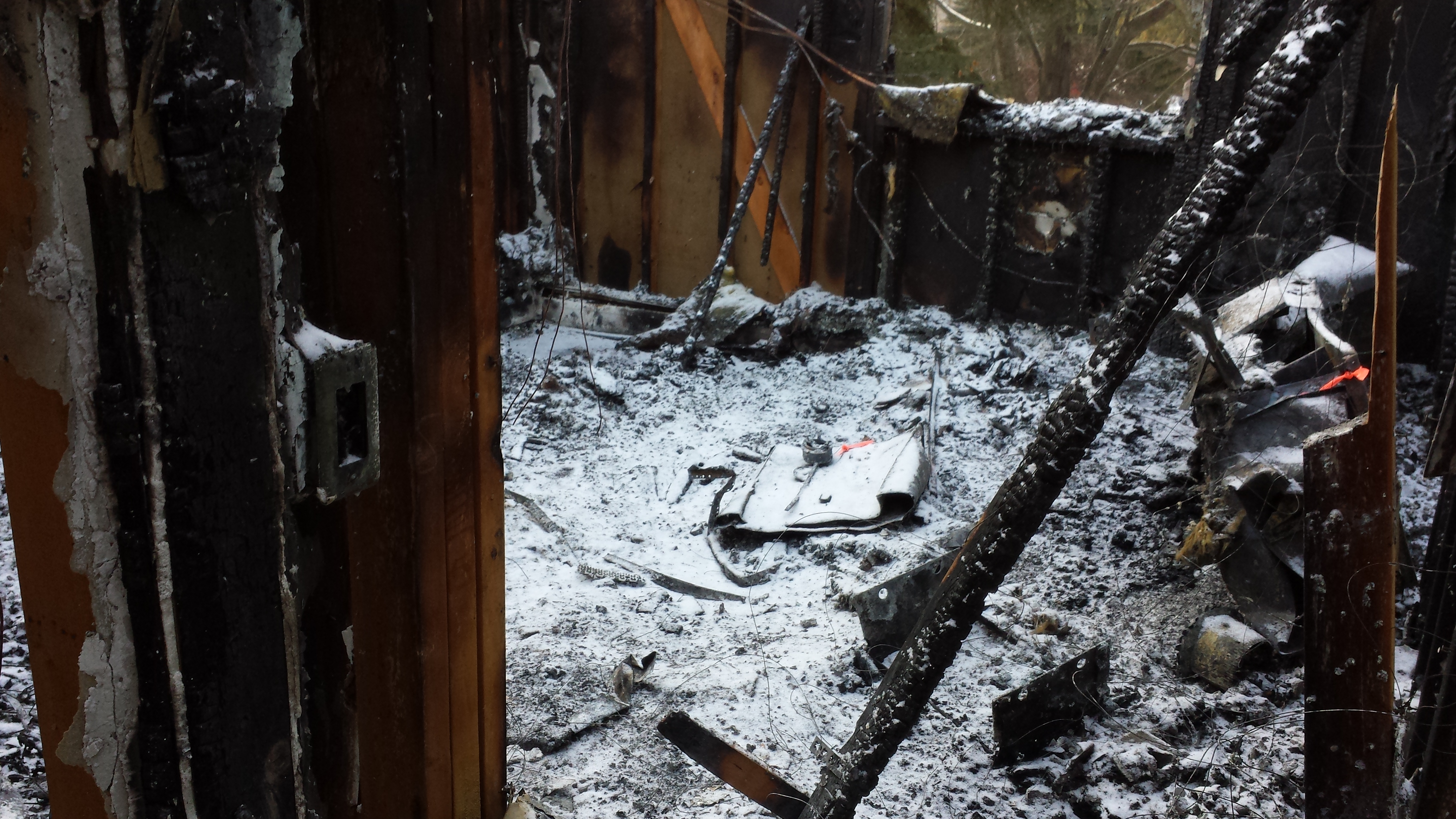
My daughter's room after the fire.
My daughter’s room after the fire.

It’s been a while since I’ve posted anything, but I have a good excuse: my house burned down. Before I tell my tale, you should know that everybody is okay, including my dog who was at the house when it happened. Everybody in our lives has been incredibly generous and supportive. We’re settled into a temporary home while our house is being rebuilt. The whole experience has been quite surreal.

The Fire

I was at work, having a normal Tuesday morning. The day had started like any other day. My wife was up getting ready, I was taking the dog out and having breakfast, and my 10 month old daughter was sleeping. My wife left for work, and I took my daughter to daycare and went to work myself. Around 11 AM, my wife called me. She told me that our house was on fire and I needed to get there right away.

With a million thoughts racing through my head, I zipped across town. My house is at the back of a cul-de-sac, and I could see my street was packed with police cars, ambulances, and fire trucks. There were two big engines in the front yard spraying water. There was no way for me to know the extent of the damage, but it was clear that my house was no longer inhabitable.

A pair of firemen pulled me into an ambulance to ask me all kinds of questions. I assume this was all standard stuff as part of their investigation. What had I done that morning? Had I cooked anything? Did my wife use a curling iron? Did I leave the lights on? Shortly after that, my wife arrived, and they asked her all the same questions.

The First Night

When we left the scene, we felt like we had nothing. The only clothes we had were the ones we were wearing. The insurance company was going to pay for us to stay in a hotel until we could find temporary housing, but we opted to stay with some friends that lived nearby instead. Our daughter was scheduled to be at daycare for another few hours, so we made trips to Buy Buy Baby and Target to get everything we needed to get by for a few days.

We focused on our daughter first. It felt like registering for a baby shower, only we needed it all that day. So what’s everything you need to care for a baby? It’s a lot. Diapers and wipes. Stuff to wear: onesies, clothes, pajamas, socks. Stuff to eat: formula, food. Stuff to eat with: bottles, bowls, spoons, bibs. Stuff to clean stuff that was eaten with: bottle brush, drying rack. A Pack & Play with a quilted sheet and a white noise machine. A toy. A book. Good? Probably not, but good enough for one night.

Now it’s time for us. You know what you don’t want to do when your house just burned down? Shop. But you have to. Okay, but where to start? Something to wear tomorrow: jeans, a casual shirt, a zip-up hoodie, socks, underwear. Something to wear tonight: pajama pants. Some toiletries: toothbrush, toothpaste, deodorant. Cell phone chargers. Good? Probably not, but good enough for one night.

Going to sleep that night was hard. I was grateful to have friends that invited and welcomed us into their home without hesitation, but I wanted to be alone. My daughter was her usual happy self, and she made it easy to laugh and smile despite everything that had gone on that day. She went to sleep in her Pack & Play without a problem, so that was a great relief. After she went to bed, I was sad and uncomfortable. I wanted the quilt my mom made me and the slippers my wife gave me two Christmases ago. I wanted to be in my bed with my pillows, but I didn’t have a bed or pillows anymore.

The Next Day

The next morning, we met with the insurance company’s large loss adjuster and fire inspectors from the fire department and insurance company. The consensus among inspectors was that this was an electrical fire that started in the attic. I was relieved to learn that the fire wasn’t caused by something we did, and my wife was unsettled to learn that was nothing we could have done to prevent it.

The fire started in the attic above my daughter’s room. The cellulose insulation we had blown in several months ago was quite flammable, and the fire spread quickly in the attic above the second story. It burned through the roof which allowed the smoke to escape, so smoke damage on the first floor was remarkably minimal, or so I’m told. By the time the fire was extinguished, there was no roof or tresses on the second floor. The only remnant of furniture in my daughter’s room was the metal base from an ottoman. There was not even a trace of her dressers, desk, bookshelf, books, toys, or her crib. It’s really scary to think about how things could’ve gone differently if we had been home.

Cleanup Begins

I didn’t really know how I expected cleanup and recovery to happen, but I was surprised with how it did. The insurance company brought vendors to deal with the different types of contents: electronics, textiles, and “everything else.” All three vendors operate similarly: they inventory everything then take anything that looks salvageable out of the home, use their restoration processes to clean each item, and store the items in a warehouse until a new home is ready to receive them. Items that are left behind or unable to be restored to their pre-fire condition are added to a “total loss” list for the insurance company.

Now, when I say “everything,” I’m talkin’ EVERYTHING. They took all the obvious stuff like furniture, pictures, computers, books, and things on shelves and in drawers and cabinets, They also took a lot of unexpected things like kitchen appliances, riding lawnmower, and snow blower. (And everything else in the garage, actually.)

At this point, the entire contents of our home has been removed and is tucked away at various vendor locations. We don’t really have an idea of what will be saved and what will need to be replaced. All we know for sure is that anything that was upstairs is gone. We may not know about the rest for several months. I’m told that the vendors typically store the items until a new home will be available.

Our Temporary Home

The insurance company helped us find a condo with a 6-month lease that switches to month-to-month at the end of the 6 months. Their paying the landlord directly, so the inconvenience to us is minimal. They’re also paying for furniture rental, which is really cool. I again didn’t know what to expect but have been pleasantly surprised. We have a fully furnished home, complete with dishes, cookware, coffee pot, toaster, bedding & linens, and televisions. We’ve been there for about two weeks now, and it feels very home-like. It’s weird because it really does feel like home, but we don’t own any of it.

Reconstruction

The contents of our house have been removed, and we’re settled into our temporary home. All that’s left is to rebuild the house. We have a building contractor who will be working with the insurance company to determine exactly what needs to be done.  We already know that the second floor needs to be reconstructed from scratch, and the first floor needs to be taken down to studs. The entire house needs new electrical and, presumably, new heating & cooling and plumbing.

We are in no way excited about what has happened, but we’re optimistic about a happy ending with an improved, updated version of the house we loved and lost. We’ve been hearing estimates of 6-7 months, so we’re just planning on getting back to our home later this year.

Thanks to Everyone

The most surprising thing–aside from the fire itself–has been the amount of support we’ve received from friends, family, and our extended network of people we’ve never even met. Co-workers have collected donations, we’ve received care packages with clothes, gift cards, and toys for our daughter. It’s been overwhelming, and we’re so grateful for everything we’ve received from everyone.

We’re so thankful that the sequence of events leading up to the fire played out as they did. Nobody was home during the fire, and nobody was hurt. Our dog was home, but she was corralled in the kitchen, as far away from the fire as she could be, before being taken to the fire department. (And the women at the fire department let her spend the day in their office and took good care of her there!) We certainly lost some sentimental items, but most of what was lost can be replaced. Thank you, thank you, THANK YOU to everyone that’s helped us throughout this whole experience.

Bluetooth Problems Galore with the Logitech H800 Headset

A month or so ago, I decided to pick up a new headset for gaming and Skype. I wanted to Bluetooth headset that I could use while charging so that I wouldn’t be bound by cords or batteries–at least not at the same time. I’ve had good luck with Logitech products, so I did a bit of research and went with the H800.

Out of the box, everything worked great. I paired it to my PC and–voila–I had sound. Great, right? Not so fast, my friend. I’ve had problems with this thing from day one.

Once I get it to work, I don’t usually have issues. The problem is getting it to work. The thing doesn’t reliably reconnect after being disconnected. Sometimes, I’d turn on the headset, and it would connect right away and work. This would happen, say, 15% of the time. Sometimes it would connect, but it would have unbearably poor audio quality. Sometimes it would connect, but it would have no audio. And sometimes it would simply not connect at all.

Ugh.

I found that my best bet when it didn’t connect and work properly would be to turn the headset off, disable the Bluetooth adapter through Device Manager, enable the Bluetooth adapter, and then turn the headset back on. This lil’ song and dance would get me a successful, high-quality connection pretty regularly. If that didn’t work, a reboot would usually do the trick.

The headset also comes with a USB nano receiver, and I’ve had no problems whatsoever using that. I don’t want to use the USB receiver, though, because it takes up one of three precious USB ports. I didn’t buy the headset to use as a USB device, and I’d be disappointed if I had to use the USB receiver instead of Bluetooth.

I was stumped on this issue. I didn’t think it was my computer because I have a different pair of Bluetooth headphones that I’ve no problems with. I didn’t think it was the headset because I’ve used it with my Surface RT with no problems. Everything that I could find online seemed to indicate that it was a problem with my Broadcom Bluetooth adapter driver, but I couldn’t find any updates anywhere. I’d tried reinstalling drivers for the headset and the Bluetooth adapter and anything else that seemed relevant, but nothing seemed to help.

And so I went on, using my headset by disabling and re-enabling devices in Device Manager until one day last week when I could no longer get the headset to work at all through Bluetooth. So annoying!

Since nothing I had tried up to that point had done anything, I thought I’d try upgrading to Windows 8. This is something that I’ve been putting off doing on this computer, anyway, and maybe the OS refresh is just what I needed. I felt encouraged when Windows 8 Setup told me that Broadcome Bluetooth Software was an incompatible program that needed to be removed before I could upgrade.

I did what needed to be done and upgraded to Windows 8, but I was no better off than I was with Windows 7. I could pair the device, but I could not get it to connect. It worked fine with its USB receiver. GAH!

Finally, I stumbled upon this forum post: Bluetooth headset is not working in Windows 8. The accepted answer said that the problem was solved by copying the Broadcom Bluetooth 4.0 driver from a working computer. I headed over to Google and searched for “Broadcom Bluetooth 4.0.” I found the Lenovo download page for it and installed it on my computer even though my ThinkPad W510 was not listed as a “Supported ThinkPad System.” When the install finished, I turned on my headset and guess what? It connected!

Despite my success, I’m not convinced that I’m in the clear. I turned off the headset and turned it back on. I had the same poor quality problem that I’ve had before. I turned it off and back on again. This time it connected, but I had no audio. I went to Windows 8’s wireless devices control panel, and turned the adapter off and back on. Now my headset connected and had good quality audio.

I love the headset when it’s working, but I’m really disappointed with the number of connection problems I’ve had. At the end of the day, I’m content to get them working by disabling and enabling the Bluetooth adapter, but it’s a step that I wish I didn’t shouldn’t have to do. I’m going to pretend that everything works how I think it should by disabling my Bluetooth adapter when I’m not using the headset.

This article was meant to be more of a, “Hey, here’s what got me past the issue!” for other folks troubleshooting similar issues. It has somewhat of a gadget review feel to it, though, doesn’t it? So I’ll wrap up by giving you my opinion of the H800 headset from Logitech. It’s a nice headset. The audio quality is good, and it connects quickly and reliably through the included USB receiver. However, because of the problems I’ve had with the headset on my Lenovo ThinkPad W510, I would not recommend this as a Bluetooth headset, although it works flawlessly with my Surface RT. Based on my experience, you’ve only got a 50/50 shot for satisfaction with the headset as an exclusively Bluetooth peripheral.

Call Method Overloads Based on Derived Type

I was creating a data access component that performed different operations based on the type of request that it received. In order to accommodate this, I have an abstract base request type defined, and handled requests derive from this type. Without getting too deep into why I had to do it this way, I had overloaded methods to which I needed to “route” an instance of the abstract class.

.NET 4 gives us an easy way to do this with the dynamic keyword. Consider the following example, which will correctly call the correct method overload:

void Main()
{
    MyBase obj = new MyOne();
    var p = new Printer();
    p.Print(obj);
}

public class Printer
{
    public void Print(MyBase item)
    {
        dynamic i = item;
        Print(i);
    }
    
    public void Print(MyOne item)
    {
        Console.WriteLine("Print(MyOne)");
    }
}

public abstract class MyBase
{
}

public class MyOne : MyBase
{
}

dynamic wasn’t introduced until .NET 4, though. So, if you have an older application, it may not be available to you. The good news is that you can accomplish the same goal by using reflection. It’s just as effective, but it’s a bit gnarlier.

public void Print(MyBase item)
{
    this.GetType()
        .GetMethod("Print", new[] { item.GetType() })
        .Invoke(this, new object[] { item });
}

So there you have it–two different ways to call method overloads based on object type!