The Way the World Should Work

Yesterday morning, I was waiting in line at Starbucks to grab a quick coffee on my way to work. The guy in front of me paid with his phone, but his balance didn’t cover the cost. He stepped aside and started the process of reloading on his Starbucks app. He seemed like a nice enough guy; the baristas knew him well enough to suggest his drink before he ordered, and he was apologetic about his mistake once he learned that he had insufficient funds. I’m not sure why he didn’t just pull out a credit card to pay for the rest, but that’s not the point. I think he panicked and just wasn’t thinking clearly, as silly as that may sound. But, I digress.

As he stepped aside, I stepped up to the register, ordered my drink, and offered to pick up the rest of his bill. It was just a dollar, and it seemed like a good random-acts-of-kindness opportunity. Plus, I figure I’ll inevitably find myself in that same position at some point. I know I’d appreciate it if the person behind me in line just floated me the buck instead of impatiently glaring at me while the barista waits and eventually decides to void the transaction in order to ring up the next person. And so I suggested that she just add my coffee to the order, and I’d pay for the rest.

The Starbucks employee let me pay for the rest of his bill, but then she did something unexpected and gave me my coffee for free. I definitely wasn’t hoping for or expecting to get anything–I was just trying to help a guy who needed a dollar. I think it was just her way of saying, “Hey, thanks for being a good person.” It was a nice surprise, and I left Starbucks feeling like this is the way the world should work.

It really felt like wins all around, too. The guy who ran out of money got helped by a stranger and an unintentionally-cheaper drink. I got the satisfaction of helping out a stranger and an unintentionally-cheaper drink. And, finally, Starbucks gets more of my business for acknowledging, supporting, and rewarding a good deed at the expense of a cup of coffee. Thanks for that!

Definition of a Good Unit Test

I’m constantly encouraging developers around me to embrace test-driven development and automated unit testing. However, there’s one very important thing I’ve neglected to include in my evangelizing: a definition for what constitutes a good unit test.

A big problem that I think a lot of developers run into is that they’re writing tests but aren’t realizing any value from them. Development takes longer because they have to write tests, and when requirements change it takes longer because they have to refactor tests. Maintenance and warranty work is slower, too, because of the additional upkeep from failing tests created with every little change.

These problems mostly exist because of bad unit tests that are written due to insufficient knowledge of what makes a good test. Here’s a list of properties for a good unit test, taken from The Art of Unit Testing:

  • Able to be fully automated
  • Has full control over all the pieces running (Use mocks or stubs to achieve this isolation when needed)
  • Can be run in any order  if part of many other tests
  • Runs in memory (no DB or File access, for example)
  • Consistently returns the same result (You always run the same test, so no random numbers, for example. save those for integration or range tests)
  • Runs fast
  • Tests a single logical concept in the system
  • Readable
  • Maintainable
  • Trustworthy (when you see its result, you don’t need to debug the code just to be sure)

This is a great list that you can use to gut-check your unit tests. If a test meets all of these criteria, you’re probably in good shape. If you’re violating some of these, refactoring is probably required in your test or in your design, particularly in the cases of Has full control over all the pieces running, Runs in memory, and Tests a single logical concept in the system.

When I see developers struggling with unit tests and test-driven development, it’s usually due to test “backfilling” on a poorly-designed or too-complex method. They don’t see value because, in their minds, the work is already done and they’re having to do additional work just to get it unit tested. These methods and objects are violating the single responsibility principle and sometimes have many different code paths and dependencies. That complexity makes writing tests hard because you have to do so much work upfront in terms of mocking and state preparation, and it’s really difficult to cover each and every code path. It also makes for fragile tests because testing specific parts of a method rely on a test’s ability so successfully navigate its way through the logic in the complex method; if an earlier part of the method changes, you now have to refactor unrelated tests to re-route them back to the code they’re testing. (Tip: Avoid problems like this by writing tests first!)

Whether you’re just getting with unit tests or a grizzled veteran, you can benefit from using this list of criteria as a quality measuring stick for the tests you write. High-quality tests that verify implemented features will result in a stable application. Designs will become better and more maintainable because you’ll be able to modify specific functionality without affecting the surround system the same way that you’re able to test it. You won’t have to worry about other developers breaking functionality you’ve added, and you won’t have to worry about breaking functionality they’ve added. You’ll be able to make a modification that affects the entire system with a high-level of confidence. I’d venture to say that virtually every aspect of software development is better when you’ve got good tests.

More Helpful Information Chosen Just for Me

I’ve been an AT&T U-verse customer for a few years now, and I’d say I’m at the “very satisfied” level of satisfaction. I get good internet speed, free HBO (3 months at a time), and wireless cable receivers. I’ve only had one problem when my DVR crapped out, and that was fixed promptly with a replacement. Last month, they called me because they “noticed that I didn’t have any active promotions” and proactively lowered my monthly bill by about $60. I love them!

Yesterday, I called their Rewards and Rebates customer support line because I moved to a new house last summer, and there was a take-us-with-you promotion that offered a prepaid Visa gift card for transferring qualifying U-verse services to a new address. I don’t remember the details now, but they put a note about the promotion on my account when I was transferring the services last year. I think it was just because I had asked about the promotion and the customer rep decided to add a note just in case the reward didn’t trigger automatically–good thing we did that! When I called yesterday, the guy I talked to read the note, reviewed my account, and issued the reward with no questions asked. I didn’t even have to wait on-hold to talk to anybody despite the standard we’re-experiencing-high-call-volumes-at-the-moment automated warning message. It was a completely painless customer support experience!

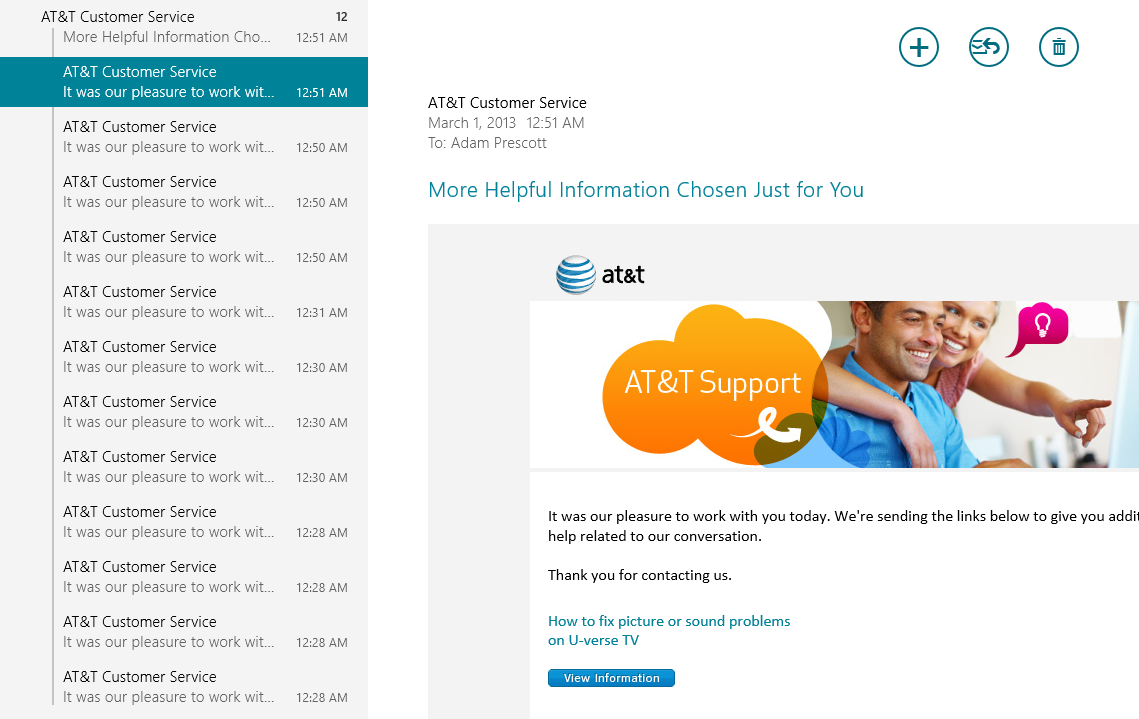
After contacting any customer support, it’s not unusual to receive a “Thanks for contacting support!” email. AT&T went the extra mile here–in a bad way–and sent me twelve of those emails overnight. TWELVE!

ATT_ThankYou

What’s up with that? Each email had the subject “More Helpful Information Chosen Just for You” and contained the following message:

It was our pleasure to work with you today. We’re sending the links below to give you additional help related to our conversation.

Thank you for contacting us.

And then each email had a different link for fixing a common problem, none of which were related to the reason I actually contacted support. But, hey, at least I’ll be in good shape if I ever need to know How to fix picture or sound problems on U-verse TV, How to fix sound problems on U-verse TV, How to launch and use AT&T Troubleshoot & Resolve, Troubleshoot U-verse: Internet, password, and email – video, Update credit/debit card or checking/savings account information, How promotions appear on your bill, Travel with U-verse, How to use Wi-Fi at AT&T hotspot locations, Perform or schedule a virus scan with AT&T Internet Security Suite powered by McAfee, Learn about AT&T Internet Security Suite, Prepare your computer to download and install McAfee Consumer products, or Download and install AT&T Internet Security Suite powered by McAfee! Thanks for all the proactive support, I guess.

I’m still a raving fan of U-verse, though. If my only complaint as a customer is that you sent me too many thank-yous after contacting support and resolving my issue, you’re probably doing okay.

If you write tests after writing the code…

If you write tests after writing the code, you assume the test is OK because it passes, when it could be that you have bugs in your tests. Trust me—finding bugs in your tests is one of the most frustrating things you can imagine. It’s important that you don’t let your tests get to that state, and TDD is one of the best ways I know to keep that possibility close to zero.

Roy Osherove, The Art of Unit Testing

A co-worker just turned me on to the book The Art of Unit Testing by Roy Osherove, and I’ve quickly fallen in love. This quote is a little nugget from the first chapter.

Consolidate .NET Assemblies with ILMerge

There have been many times when I’ve thrown together a small utility app intended for situational use in specific scenarios. These scenarios are usually of a one-and-done nature, where they need to be done once and that’s it. It doesn’t make sense to have an installer that deploys the app to a permanent location in Program Files. What I really want is to have an EXE that I can copy to the desktop on a remote machine, use it, and junk it. There’s a wrinkle, though: the apps usually have some external dependencies, so it’s typically an EXE plus a handful of DLLs.

It’s not a huge problem, I just keep the EXE and its dependencies in a ZIP archive or folder. When I need the app, I copy the archive/folder. This works fine, but it’s not as simple as I’d like. It’s also error-prone, since another user may not realize that the accompanying assemblies are required dependencies. It’d be nice to roll the EXE and its dependencies into a single assembly, and that’s exactly what ILMerge does!

ILMerge is a Microsoft Research project that allows you to merge multiple .NET assemblies into a single assembly. It’s a command-line tool, but you can also use it programmatically.

Here’s the basic command-line usage:

ILMerge.exe /out:Target.dll PrimaryAssembly.dll ExternalAssembly1.dll ExternalAssembly2.dll etc.

I used ILMerge to consolidate a WCF client proxies library with several data contract assemblies. It worked great! Now, instead of telling service consumers to copy the client proxies assembly plus a short list of contract assemblies, I can tell them to grab the one consolidated assembly to get everything they need. Writing an app to consume my services is done with one new reference–to the consolidated assembly–and less than 10 lines of code. A previously complicated process is now remarkably simple!

Unfortunately, it sounds like ILMerge doesn’t work for WPF assemblies, but the ILMerge website offers the following alternative:

If you cannot use ILMerge because you are trying to merge WPF assemblies, then here is a great way for you to get the same effect, courtesy of Jeffrey Richter: embed the dlls you want to merge as resources and load them on demand! In many ways, this is a better technique than using ILMerge, so I strongly urge you to check it out, even if ILMerge is working for your scenario.

ILMerge can be downloaded from the Microsoft Download Center here. It’s also available through NuGet. I haven’t tried that out yet, but I’m intrigued. I’ll probably try using NuGet to include it with each project I intend on using it with to ensure availability in builds and workspaces.

11 Simple Concepts to Become a Better Leader

Article: 11 Simple Concepts to Become a Better Leader

This is a typical be-a-good-person-and-people-will-like-you article, but it’s good to remind ourselves of that from time to time. The concepts presented in the article that I feel are most important are transparency, adaptability, and gratefulness.

Transparency is a great leadership quality because it earns trust over time. I hate playing games. It doesn’t get anybody anywhere. If you told me you were going to start working on a project but got distracted, don’t tell me that it’s moving along just fine. Tell me you got distracted and haven’t started, but also tell me when you’ll be starting it and what will be the impact on the project timeline. Being transparent also drives customer satisfaction because it helps set and adjust expectations.

I presume the importance of adaptability transcends industry–hence its inclusion in the list–but it’s incredibly important for software development. In my experience, it’s pretty rare to have a project that goes 100% as planned. Next to never. And I’m talking about “next” being on the other side of never, not the side where it might actually happen. Understanding when to deviate from the plan is key. It might be to overcome a challenge: “We thought we could do X, but that’s not going to work. Let’s do Y instead.” It’s not always a problem that makes adapting advisable, though; it could be an unforeseen improvement: “We planned on doing X, but it makes more sense for the users if we do Y.”

And, finally, gratefulness. My least favorite type of co-worker is the ungrateful leech. You never hear from them until they need something. Then, you go out of your way to help them out–because you’re awesome and that’s how you roll–and you’re lucky to get an email that says, “Thanks.” When those guys come around looking for help, I don’t like to give it to them. On the other hand, you’ve got people who genuinely appreciate what you’ve done. They offer to buy you lunch or a drink. Gratefulness goes a long way, even if it’s just saying, “Seriously–thanks. You really helped.” When those guys need help, I’m happy to drop what I’m doing to give it to them. It’s not because I hope to get free stuff, it’s because I know my effort will be appreciated. As a leader, you’re playing the role of the guy who needs stuff in these scenarios. Do you want to be the guy that people do things for because they have to or because they want to?

VS2012 Achievements Failure

I’m not sure exactly how long I’ve had this problem, but Visual Studio 2012 would crash every time I tried to build a solution that contained a Wix project. My workaround was simple: unload the Wix project or use Visual Studio 2010. It was more of an annoyance than a work-preventer, so I didn’t really worry about it. Yesterday, I thought I’d try to figure it out.

At first, I didn’t really have much to go on. I had some exceptions that showed up in the Event Viewer, but the internet didn’t seem to pick up on any correlation between Wix, VS2012, and the exceptions. I also asked our resident install guy/Wix expert if he’d run into this or heard about it from other developers. He hadn’t. He did some googling and gave me a few results related to the .NET Reflector plug-in, but I didn’t have that installed.

Eventually, I ended up on this forum post. The first comment made me feel pretty dumb:

Did more debugging using the vs2012 log: the WiX installer project triggers an exception in the vs extension “Visual Studio Achievements For VS 2012” published by Microsoft.

Ugh, really? The Visual Studio Achievements extension? It’s so irritating to discover that this gimmicky plug-in causes Visual Studio to completely crash and die when building a Wix project! I disabled the extension, restarted Visual Studio, and I was able to build Wix projects. I liked getting random achievements from time to time, but after this, I’m out. Have a good life, Visual Studio Achievements.

Registry Hack for Flash in Win RT

One of the measures Microsoft has taken to improve security in Windows RT is to only play Flash content from sites on their Compatibility View (CV) list. Over time, I doubt this will be much of an issue as more and more sites are moving to HTML 5 and away from Flash, but it causes some pain now because there are sites I want to use that haven’t found their way onto Microsoft’s list.

Let’s ignore the problem with other sites for a moment and focus on a different problem. What if you’re a Flash developer, and you want to get your application approved by Microsoft and onto the CV list? You need a way to test your application, right? Microsoft has published an article about a registry entry that will override the CV requirement for a single domain.

The short version is that you just need to add the domain to the following registry value:

[HKEY_LOCAL_MACHINE\Software\Microsoft\Internet Explorer\Flash\DebugDomain]

The article adds some important notes about the value to enter:

  • Direct URLs to a page or resource are not supported (for example, contoso.com/xyz). Any value containing ‘/’ is not supported, including: http:// (or https://).
  • Do not use “www.” prefix, which is stripped (for example, http://www.movies.yahoo.com loads as http://movies.yahoo.com).
  • Only a single domain is supported.

So, using this same trick intended for developers, we can override the restriction for individual sites. I tried this out on my Surface RT with a site that I had problems with previously, and it worked like a champ. Here’s the step-by-step version of what I did:

  1. Go to Desktop Mode
  2. Open a Run prompt by pressing Windows key + R
  3. Run “regedit”
  4. Browse to HKEY_LOCAL_MACHINE > Software > Microsoft > Internet Explorer
  5. Right-click Internet Explorer and choose New > Key; name the new key “Flash
  6. Right-click Flash and choose New > String Value; name the new value “DebugDomain
  7. Double-click DebugDomain and enter the domain; I used “digital.olivesoftware.com”
  8. Close Registry Editor
  9. Open Internet Explorer, browse to the site, and enjoy Flash content!

This works great, but it’s annoying that you can only do one domain at a time. An idea for making this slightly less painful is to export the Flash registry key to create shortcuts. To do this, right-click “Flash” in Registry Editor and choose Export. You’ll be prompted to save the key to a file, and you can update the key by double-clicking the file that is created. Using this method, you can create several shortcuts for sites that you visit frequently. It’s obviously not ideal to need to update your registry before browsing to a site, but, hey, it’s better than not being able to use your favorite sites, right!?

“A late change in requirements…”

A late change in requirements is a competitive advantage
–Mary Poppendieck

My team works almost exclusively on small, custom projects. Each project begins with high-level requirements gathering, an estimation of effort, and a cost proposal. If the customer accepts the proposal, a contract is signed, and my team works with the customer to create a more detailed requirements document before beginning development.

The problem with this process is that it isn’t very agile, and, even though we complete the project by converting the requirements document into stories and banging them out in sprints, we sometimes fall into the same old waterfall-pitfalls. Requirements written at the beginning are not always the right requirements. Something that seems very important at the start might not make sense by the end. Or, there might be aspects that weren’t considered during requirements gathering, which can lead to important requirements that went undocumented.

At the end of any project, what matters most is that the customer feels good about the business value they’re getting from what they bought. If a project satisfies all of its requirements but ultimately provides no value to the customer, the project is a failure. Conversely, if a project meets only a subset of its requirements but delights its customer, it can be considered a success.

Realizing that requirements will change–and expecting them to–is an important strength of agile methodologies. As features are completed, review them with the customer and re-evaluate what comes next. Sometimes, you might find a feature is no longer needed. More likely, you’ll uncover a feature that was missed but will provide much greater value than what was originally proposed. Shifting requirements late in the game is how you can take advantage of a newly found feature like this, and that’s part of what makes agile so powerful.

Writing Tests First

I think it’s safe to say that everybody agrees on the value and necessity of automated unit tests. Writing code without tests is the fastest way to accumulate technical debt. This is one reason why test-driven development (TDD) has become an accepted and preferred technique for developing high-quality, maintainable software. When asked to describe TDD, a typical response might include the red, green, refactor pattern. The idea is that you write a failing test first (red), make it pass (green), and then clean up after yourself (refactor). Easy, right?

Not so fast, my friend.

It breaks my heart to say it, but I think most of the developers on my team don’t write tests first. They follow more of a null, refactor, green pattern. Code is written first. It’s assumed to be pretty good but not verified. Then refactoring occurs to make the code testable as unit tests are written to test the code. I have a few problems with this.

First and foremost, by doing tests last, you’re making it possible to be “done” without proper tests. You should never have somebody say something like, “It’s done, but I didn’t have time to write all the tests.” I’ve seen this happen too many times, and it’s completely unacceptable. You aren’t done until you have tests, and the best way to ensure you have tests is to write them first. Period.

By not writing tests first, you’re also opening yourself to the possibility of writing untestable code. Regardless of whether or not you write tests before or after, you’ll have to figure out how to test the code you are or will be writing. If you write the tests after code, you might find yourself doing some heavy refactoring and restructuring to make the code testable–a step that could have been avoided completely by simply writing the tests first. Conversely, writing tests first empowers you to make smart design decisions that ensure testability before you’ve implemented your solution. Writing tests first forces you to write testable code, and testable code is typically more well-designed.

Tests-first help from a requirements perspective, too. You’re obviously trying to accomplish something by writing code, so what is it? Write failing or inconclusive tests to represent your requirements, and you’ll be less likely to accidentally miss a requirement in the heat of your fervorous coding. If you don’t know the requirements, you probably shouldn’t be coding anything. That should be a huge red flag. Stop coding immediately, and go figure out the requirements!

I don’t think I’ve presented anything terribly controversial here, so why aren’t people writing tests first? In my opinion, it’s primarily a mental block. You have to commit to it. Executing can be tricky–especially in the beginning–but making the commitment to write tests first and sticking to it is really the hard part. Execution will come with time and practice. But you still need to start somewhere, right? So, I’ve whipped up a simple workflow to help get you started. Note that a lot of this is situational, but the basic idea is to start with stubs and do only enough of the actual implementation to complete your test.

  1. Write a test method with a descriptive name.
    1. If I’m going to be writing a Save method, my first test might be named SaveSavesTheRecordToTheDatabase or just SaveSaves.
    2. Implement the test with a single line of code: Assert.Fail() or Assert.Inconclusive().
    3. Note that the Save method might not exist at this point! I’m just spelling out what I want to accomplish by writing test methods.
    4. Repeat for each requirement.
  2. Begin implementing the test.
    1. This will be different depending on the nature of what’s being tested. It might be defining an expected output for a given input. For my example Save method that will save the record to a database, the first thing I might do is create a mock IDatabase and write an assertion to verify that it was used to save the record.
    2. Go as far as you can without implementing your actual change.
    3. Leave your Assert.Fail() or Assert.Inconclusive() at the end of the test if there’s more work to be done.
  3. Begin implementing your changes.
    1. The goal should be to make the test code that you’ve written so far pass or to free a roadblock that prevents you from writing more tests. How will my Save method get access to an IDatabase? Will it be a method argument? Passed to the constructor? I can address these implementation details without implementing the Save method.
    2. Identify and write more tests as you go! For example, did you add a new method argument that will never be null? Add a test to verify that an ArgumentNullException is thrown if it is. Are you making an external service call? Write a test to verify that exceptions will be handled. Write the new tests before you implement the behavior that addresses them!
    3. Go as far as you need to complete your test code.
    4. Use stub methods that throw NotImplementedException if you need a new method that doesn’t have tests.
  4. Finish implementing the test.
    1. Add mocks, add assertions, and implement the rest of your test.
  5. Finish implementing your changes.
    1. Now, with a complete test, finish the rest of your implementation.
  6. Review tests and changes.
    1. Add additional test cases to verify alternate scenarios.
    2. Look for edge cases and ensure they’re covered. (Null checks, exception handling, etc.)
  7. Refactor!
    1. Don’t forget to cleanup after yourself!
    2. Now that you have a solid set of tests, you can refactor your code to make it shiny and clean. The tests will ensure that you don’t lose functionality or break requirements.

This isn’t a perfect workflow, and it won’t work for all scenarios. It’s just meant to help get you over the I-can’t-write-a-test-for-this-yet hump. Remember that writing tests first is a decision you make, above all else. Commit to write tests first. Fight the urge to implement first and test later, and stop coding if you find yourself implementing sans tests. After some time, it will become habit. You’ll learn how to deal with the tricky stuff.

Do you have similar experiences with getting teams to adopt TDD? I’d love to hear about them! Please share your thoughts and ideas related to the topic. What are some things that you’ve done or had done to you to improve adoption of TDD and actually writing tests first?